
Adding a Configurable Note to the Footer of a Bill Estimate
This guide will walk you through the process of adding a custom note to the foot of bill estimates, specifically to highlight any potential additional VAT charges.
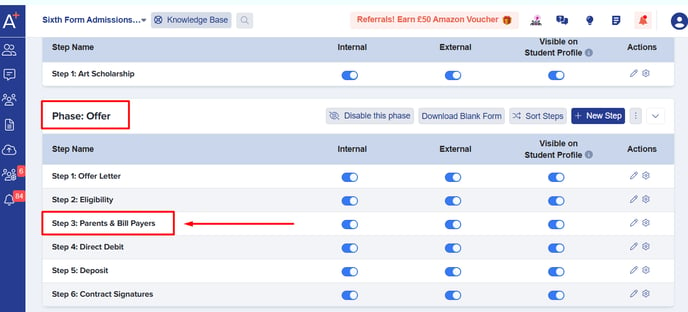
From the dashboard, navigate to Settings > Application Form, then select the Parents & Bill Payers step under the Offer phase.

In the Other Settings section, toggle VAT on Bill Estimate to enable it, then enter your custom message in the VAT on Bill Estimate description field below.

No need to click a Save button - your changes are automatically saved as soon as you click outside the text field. A notification will appear at the top of the page confirming the update.

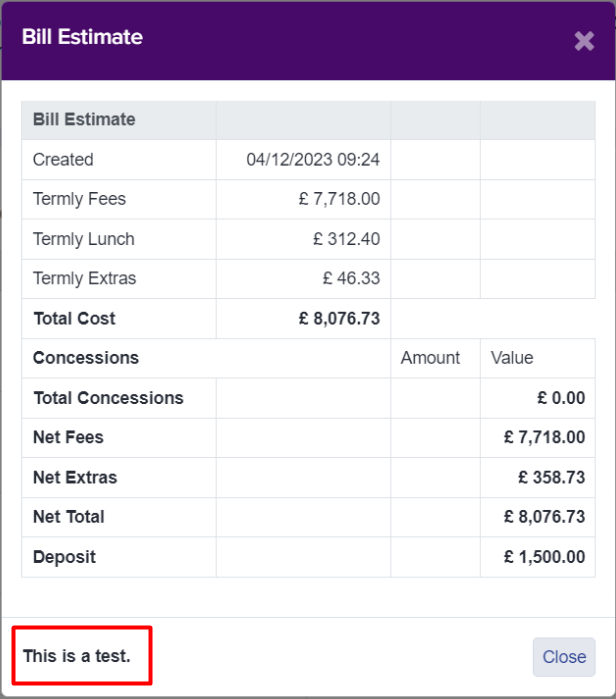
Here's how it will appear from the parents' perspective.
We hope this guide helps you configure your settings smoothly. If you have any questions, feel free to reach out to your Customer Success Manager, or contact our Support team at 0203 667 0764.
Was this article helpful?