
How to Change Parent's Email Address
This will allow you to change a parent's email address in A+ if a parent wishes to change or update it to their current email address.
There are two ways of changing the parent's email:
First - when you're on the main dashboard you should be able to see the Parents and Enquiry Icon on the left-hand side of the page. First Icon on the A+ homepage
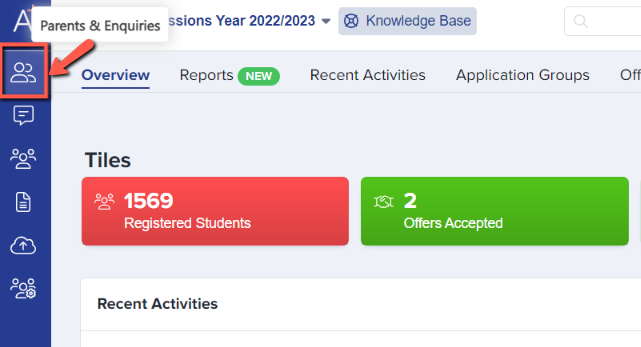
Click on that Icon and it'll give you two options kindly choose "Parents" which will show you a list of parents on a table
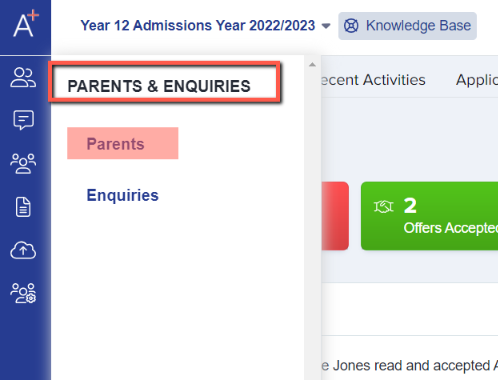
Select the parent you'd like to edit the email by clicking the ID or First Name or Last Name.

From the profile, you should see the email (anything with the underlined with dashes can be edited) click the wording and edit then hit the blue check mark to save the changes made.

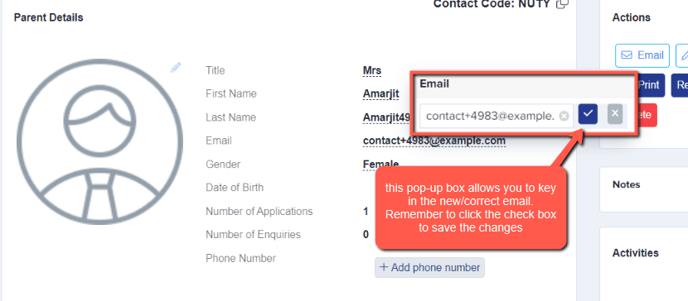
You can also do the same way by searching for the parent on the search bar at top of the page.

After clicking that, you should be directed to the parents profile to perform email address change.

You also have the option to reset the user's password by clicking the "Reset Password" button in the Actions tab.
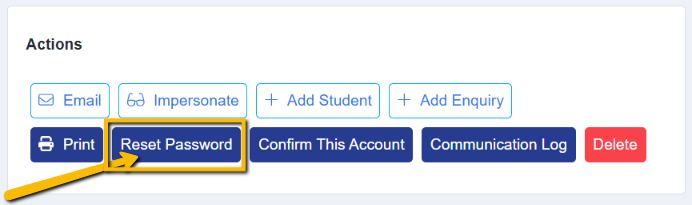
Additionally, you can choose whether or not to send them an email notification about the change. However, we recommend sending the notification so they can update the password to one of their choice.

If you're unable to update their email address, please reach out to your Customer Success Manager or submit a support ticket so our technicians can assist you further.
Was this article helpful?