
How to follow up with incomplete bursary applications
This article explains how you can send a follow-up email to students with pending bursary applications
On the left hand side of the screen click on 'Registered Students' icon, then select "Not Started" to see any students who have registered but not begin their application, or "In Progress" to see those who are partially-completed.
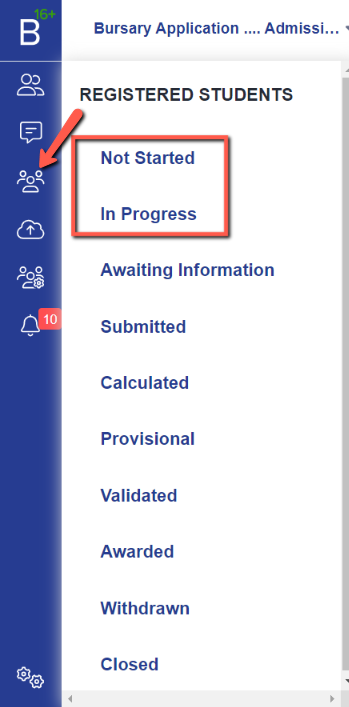
You can also do this from your dashboard tiles, or by the Bursary Status widget.


You will see a table containing all students who have the status you chose. Select all students then click on the 'Communications' button and select 'send email' from the dropdown options.
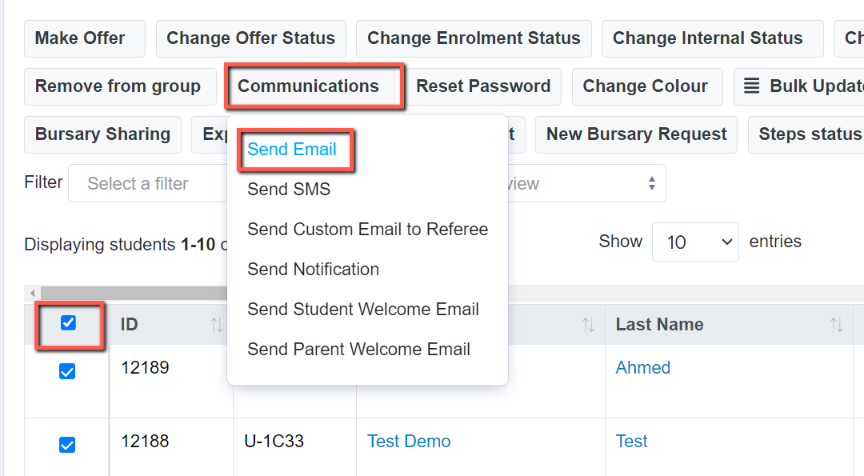
An email processor window will come up and will enable you to select a pre-made email template, or you can type your content directly.
To insert a pre-made template, just select from the 'Template' dropdown option then 'add template'.

You can type a message directly to them in the 'content' field instead, if you have not pre-made a template in the manual messages area of your system.

With all messages, you can choose who your recipient(s) will be.

Click on 'Send Email' when done and this will be sent to all of the selected recipients.
Was this article helpful?