
How to assign people to approve the request
As an admin user, you're able to allow your colleagues to approve requests.
First, add your colleague's name and email as a 'user' on your Bursary Platform
Go to 'Settings > School settings > Users

If your colleague is not yet added as a user, please add first as shown below.
You may set them as a 'Super Admin' role (If you want that person to have full access and control on the system) or you may just set them as a "Bursary staff".
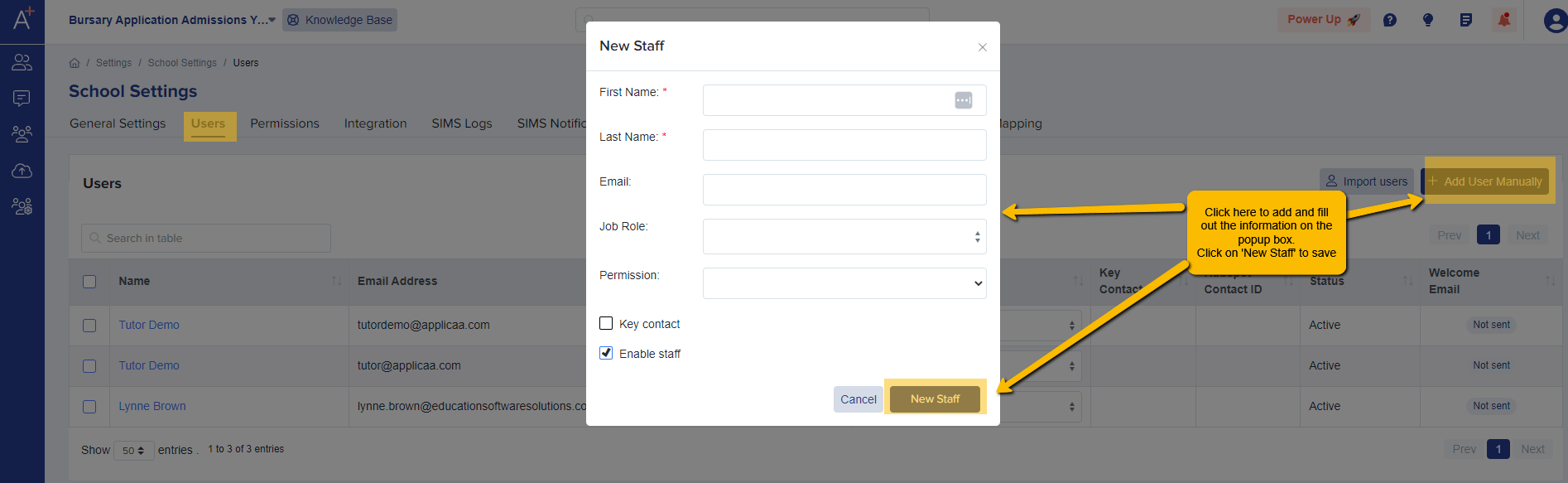
Once done, have a look at the 'Permissions' tab to check what the user can edit, create, delete or access. You have the option to give restrictions on some areas if you like.
To give permissions to approve bursary requests, go to the 'bursary requests' tab and make sure that the relevant permissions (view, edit create, approve) are ticked so the staff can approve requests.

Now, after adding your colleague and setting their permissions, go back to the staff list to select the newly added staff and send them a welcome email with their log in details.

Was this article helpful?