
Your CSM will guide you throughout your first cycle, and it can be helpful to consider these points when thinking about collecting additional data from feeder schools, and inviting applicants to transition or taster events
1. Do you need to collect additional data from applicants' current schools, about their attainment in certain subjects, friendship groups, and welfare needs?
2. Will you invite children to transition events at your school, and do you need to collect registrations for this (primary and Year 7)?
3. Will you run taster days for students to attend and sample the subjects they are interested in studying (year 12)?
4. Will you need to organise applicants into form groups, bearing in mind friendship groups, previous schools, SEN and other key criteria?
Linking an event to a specific application form
Every event in Admissions+ is created against an application form, and it must be linked to at least one form before it can be saved. This is how you set up an event that relates to a particular intake - for example, an entrance test, open evening or transition event that should be tied to your Year 7 application form.
Open the application form you want the event to relate to, then go to "Communications & Events" and open the "Events" tab. Select "New Event" to start setting up your event.

As you complete the event, open the "Visibility" section. Under the heading "Which forms does this event relate to?", use the "Apply for" dropdown to choose the application form (or forms) the event belongs to. Each form is listed with its admissions year and entry point - for example "Thao (2028/2029, Year 7 Data Collection)" - so you can pick the exact intake, such as your Year 7 form for an entrance test.
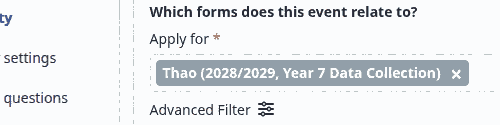
You can link an event to more than one form if it applies to several intakes. Once an event is linked to a form, its registrations, invitations and guest records are tied to that form, so applicants on that form can be invited to register, and the event can be shown on the related login and homepage for those applicants.
Finding the booking form for an existing event
Each event stores its registration questions on a "question template" (an event form). This is the booking form. Use one of these two ways to find it for an event you already created.
Open the application form, then go to "Communications & Events" and open the "Events" submenu. Select "Event Calendar" to see every event on this application form.
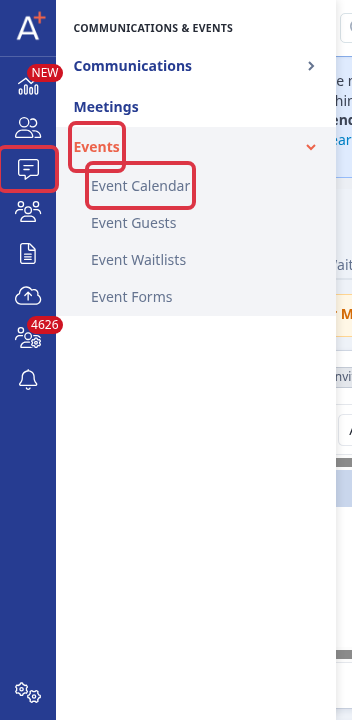
Find your event by its exact name, for example "Year 7 Open Day". A generic description, such as "taster day", does not match an event name and returns no result.
Open the event and select "Questions" in the event's side menu. The "Use this question template for newcomers" field shows the form attached to the event. This is the booking form your applicants complete when they register.

As an alternative, go to "Communications & Events", open the "Events" submenu, and select "Event Forms". This page lists every question template for the application form. The "Events Used" column shows how many events use each form, and its number is a link back to those events.
