When you email parents and guardians, only contacts set up to receive communication receive the email. "Parental Responsibility" affects recipient filters, but it does not guarantee delivery.
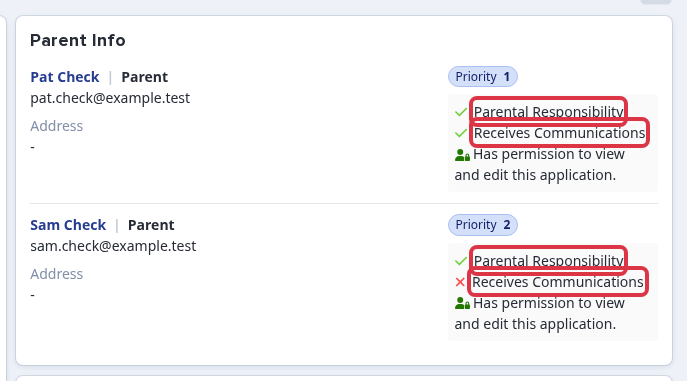
You can see each contact's status on the student's profile. Open the student and review the contact cards under "Parent Info". Each card shows separate "Parental Responsibility" and "Receives Communications" indicators.
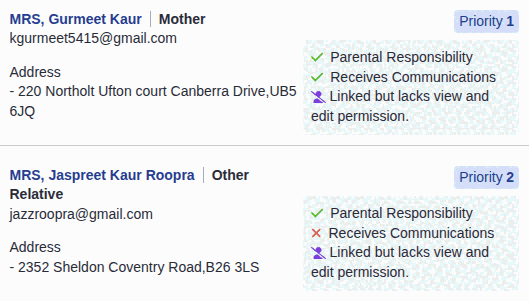
These are separate settings. A contact can have "Parental Responsibility" selected and still not receive emails if "Receives Communications" is off.
If a contact has "Parental Responsibility" selected but does not receive emails, check the following:
- "Receives Communications" is selected for that contact.
- The contact has a valid email address on their record.
- The contact has not unsubscribed from your emails.
- The email recipient filters do not exclude the contact.
When you compose an email, the recipient filters can narrow the parent list. "Only include contacts where Parental Responsibility is ticked" sends only to contacts with that setting. "Priority numbers" and "Only include contacts that live with the student" narrow the list further.
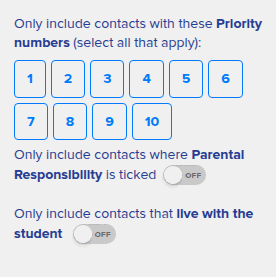
- Leaving all filters off sends to every contact set up to receive communication.
- Each filter removes contacts who do not match it.
Check the contacts before you send
On the student profile, check each contact card. A green tick beside "Receives Communications" means that contact is eligible for parental communication. "Parental Responsibility" and "Receives Communications" are separate checks.
Send one email to students and parents
Select "Student(s)" for the student recipients. Select "CC parental contact(s)" to copy eligible parental contacts, or "BCC parental contact(s)" to copy them without showing other copied recipients. These controls use the contact settings and any filters in this email.
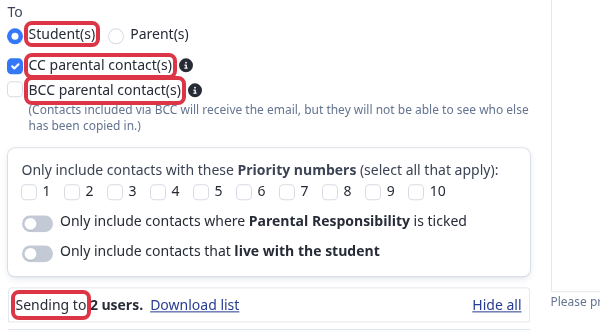
Use the same recipient controls after you select internal or external applicants. The check is based on the selected students and their eligible contacts. If the application form disables student emails, the email screen offers only "Parent(s)".
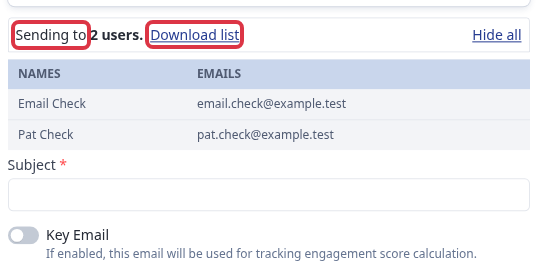
Before you select "Send email", check the "Sending to" count and the displayed addresses. Select "Download list" when you need to review the complete recipient list. This confirms who the email will be sent to. It does not prove that an email reached an inbox.