
The "Referrals & Billing" area (shown as "Accounts & Billings" if your school does not have the referral program enabled) is where you see your school's current subscription, its renewal date, and your invoice documents. Use it to check when a subscription is due for renewal, confirm whether an invoice has arrived, and find out who to contact about payment.
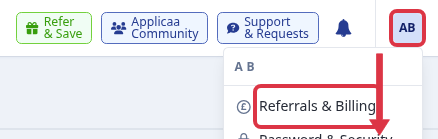
Go to your account menu in the top right corner and select "Referrals & Billing".
Checking your subscription and renewal date
The "Current Plan(s)" table lists each active subscription with:
- The subscription name.
- The subscription term - its start and end date.
- The next billing date, which is also the subscription's renewal/expiry date. A coloured flag appears next to it: orange "Due soon" when the renewal date is within a month, or red when it is overdue.
- The current bill amount and the renewal amount, including any referral discount you have earned (shown as a struck-through original price next to the discounted one).
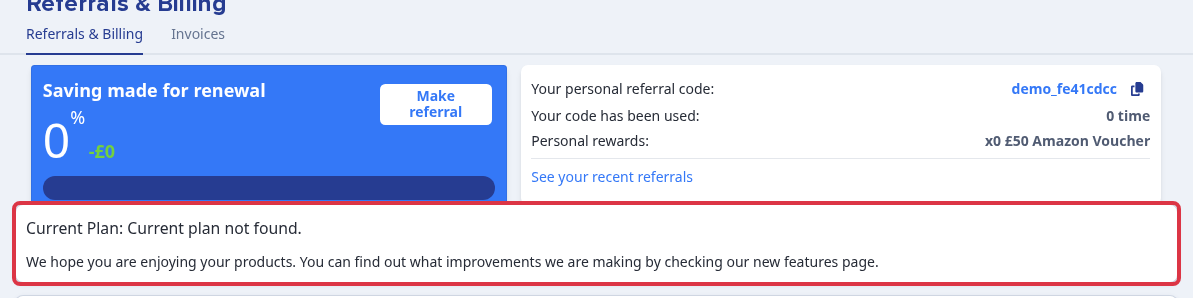
A subscription only appears here while today's date is between its start date and its end date. Once a subscription's end date has passed - for example a subscription that expired on 31 July - it drops off this list and the page instead shows "Current Plan: Current plan not found." This is the state to expect if you are calling about a subscription that has already expired: the page will not show an "expired" entry for it, only the empty message below.
Either way, this page does not stop you from using the rest of the product. Starting a new application form, or anything else in Admissions+, does not depend on an invoice being paid or a subscription appearing here.
Viewing your invoices
Select the "Invoices" tab at the top of the Billing page to see your invoice documents: the invoice number, invoice date, file name, file type and size, with an eye icon to open each one. If no invoice has been added yet, this tab shows "Invoice not found."

An invoice here is a document for your records, not an in-app payment screen - opening it does not take a card payment or mark it as paid. Paying an invoice, confirming your school's bank details, or chasing up an invoice that has not arrived is handled directly by Applicaa's billing team rather than through a button on this page.
Questions staff ask
Our subscription has expired - how do we renew it? Contact Applicaa's billing team at billing@applicaa.com. They handle renewal quotes and will not change what you see on the Billing page themselves - once your renewal is processed, your new subscription term appears in the "Current Plan(s)" table above.
Does an unpaid invoice stop us using Admissions+? No. The product does not block any feature, including setting up a new application form, because of an invoice. If your school's service is genuinely at risk of being paused over a seriously overdue invoice, Applicaa's billing team will contact your school directly - email billing@applicaa.com if you are following up on that kind of notice, or to confirm bank details or chase a billing email that has gone unanswered.