
Sometimes the same applicant ends up with two profiles in Admissions+ — for example when they start a second application but never finish it. When one of those records is an incomplete duplicate you don't need, you can remove it directly from the applicant's profile. This guide shows you how, and when to merge the two profiles instead of deleting one.
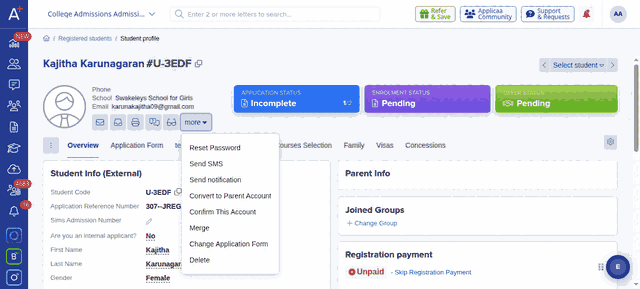
First find the duplicate applicant using the search bar at the top of the page, or open them from your Registered students list, and load their profile. You can tell an incomplete application by its "Incomplete" application status shown at the top of the profile.
On the profile, open the "more" menu next to the applicant's contact icons, then select "Delete".
A confirmation window opens headed "Permanently delete <name>?". To confirm you really mean to remove this record, type the applicant's first name into the box exactly as shown, then choose how much to remove:
- "Delete" removes the applicant's application record only.
- "Delete student & Related contacts" removes the applicant together with the parent/guardian contacts attached to that record.
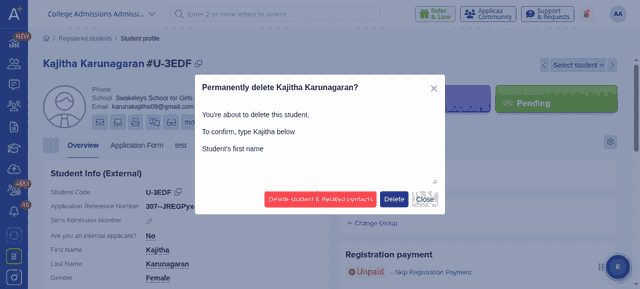
Once you confirm, the duplicate is permanently removed and no longer appears in your student lists.
When to merge instead of delete
If both profiles hold information you want to keep — for instance the duplicate has contact details or answers the original is missing — merge them rather than deleting. Open the "more" menu on the profile you want to keep and select "Merge", which lets you combine the two records into one. This is the safer choice whenever you are not certain the duplicate is empty.
Things to know
- Deletion is permanent — the record cannot be restored afterwards, so double-check you have the right duplicate before confirming.
- The "Delete" option only appears if your role has permission to delete students. If you don't see it, ask an administrator at your school.
- Deleting works on any application, but it is most commonly used for incomplete duplicates that were never submitted. If the applicant is a genuine one you simply no longer want to progress, consider changing their application status to "Withdrawn" or "Declined" instead, which keeps the record for your reporting.