
The search bar at the top of every page lets you quickly find a student and open their profile. This article explains which of a student's details the search looks at, and answers a question we're often asked: can you find a student by their phone number?
You'll find the search bar at the top of your dashboard, where you'd normally type a student's name to open their profile.

Start typing two or more letters and matching students appear straight away. The search looks across each student's first name, last name, email address and their student (admission) code, so any of these will bring up the right person.
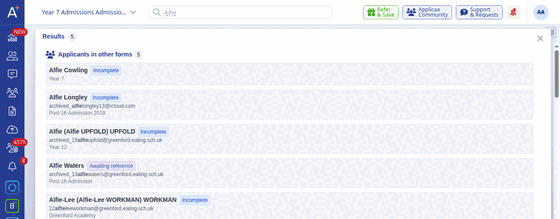
You can search for a student using any of these details:
- First name or last name
- Email address
- Student (admission) code
Phone number is not one of the details the search looks at. Typing a mobile or home phone number will not bring up a student, so use the student's name, email address or student code instead.