
This guide will show you how you can create a new academic year for the next bursary cycle, or to move current applications that are in the wrong application year.
To create a new Academic Year, this needs to be added on your system’s properties area first.
To do this, navigate to your Settings (on the lower left corner of your screen) > Properties and then Properties again.

On your properties area, look for “Bursary Application Year”.

Once you've clicked on the pencil icon, you'll see list of academic years, and then you may tick the "active" boxes to activate the new academic year and press save.
If the new year is not yet added, use the Add New Answer button to add the new year to the list.

When you return to your Dashboard, your new Academic Year will be visible in the top right corner of your screen, only when at least one student has renewed their bursary or you have received new applications for the new cycle. You may create a test student to kick start this.

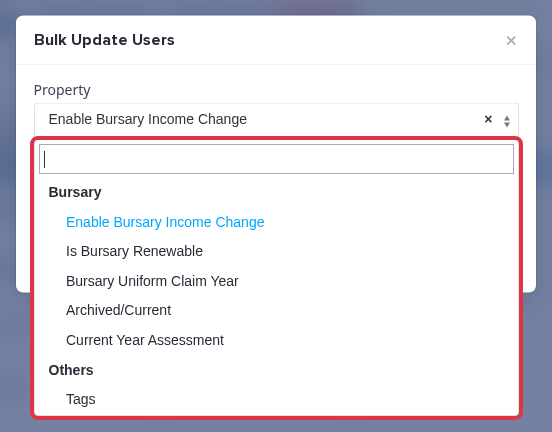
Why "Bursary Application Year" no longer appears in Bulk Update
You cannot change the Bursary Application Year on an existing application through Bulk Update, and you cannot edit it on the student's own record either. This applies to every school, not just yours.
Select one or more students from any student list, press Bulk Update, and open the Property field. The dropdown no longer lists "Bursary Application Year" as an option:
The value still shows further down on the student's own profile, but with no pencil icon next to it, unlike the fields around it that are still editable there:
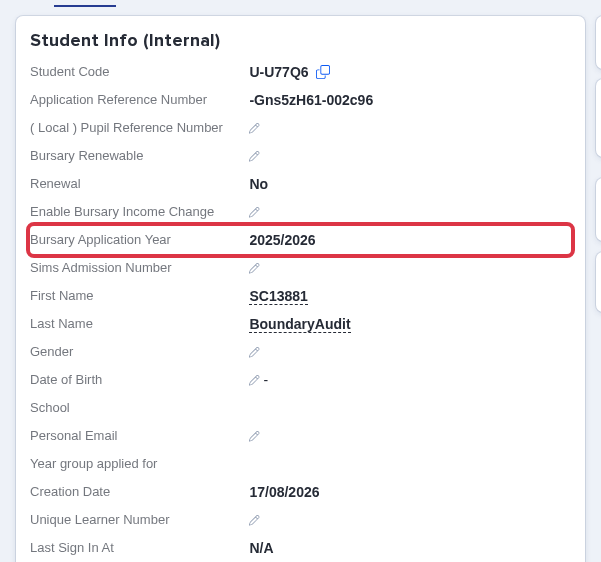
This is intentional. Changing the academic year directly, outside the normal renewal process, could leave a student's bursary status out of step with their new year. To avoid that, the field is locked everywhere it used to be editable.
- Moving a student up to the next bursary cycle (for example Year 12 to Year 13)? Use the renewal process below - it sets the next academic year for you automatically.
- Application filed under the wrong academic year by mistake? You cannot correct this yourself. Contact your designated Customer Success Manager if you're still in your first cycle, otherwise contact our support line on 0203 667 0764, and they'll make the correction for you.
What happens to the academic year when a student renews
Please note: the process for allowing students to renew an application for the following academic year is different to the steps outlined above.
You should only change a student's Bursary Application Year if their application was made to the incorrect year in error.
Students who need to reapply for their bursaries when moving up from Year 12 to Year 13 need to be marked as Bursary Renewable and you can follow the process in this guide.
Renewing a student does not edit their existing application. It creates a brand new application for them and sets its Bursary Application Year to the next cycle automatically - for example, an application in 2025/2026 renews into one dated 2026/2027. The old application is kept, linked to the new one, so you can still see its history.
You do not need to set the new year yourself, and like any other application, you cannot change it afterwards either - the same lock described above applies to a renewed application's academic year. If the year a renewal lands on is wrong, that also needs a correction from the Applicaa team rather than a self-serve fix.
Should you have any further concerns/questions, please contact your designated Customer Success Manager if you're still in your first cycle, otherwise contact our support line via this number 0203 667 0764, and they'll be glad to assist you.