
Use the Bromcom export mapping to check school history data. Use Bromcom User Defined Fields for an extra application question that the fixed export does not include.
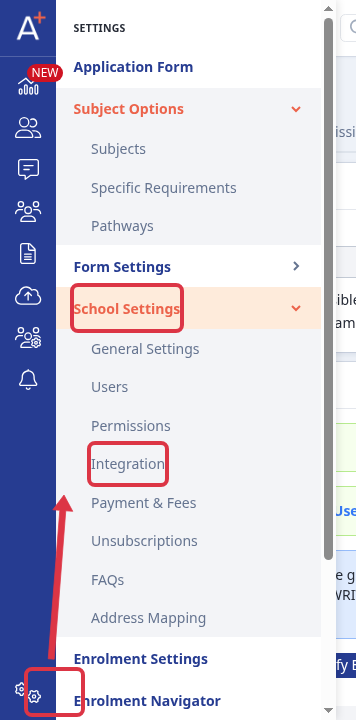
Go to "Settings" > "School Settings" > "Integration" to check the Bromcom connection and its permissions.
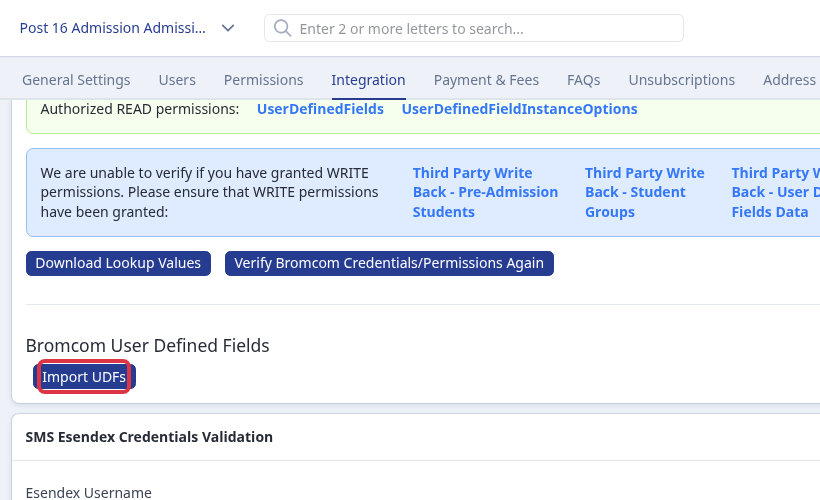
Ask your Bromcom administrator to create the User Defined Field first. When Admissions+ shows valid Bromcom credentials and the "UserDefinedFields" and "UserDefinedFieldInstanceOptions" READ permissions, select "Import UDFs". Admissions+ shows "UDFs successfully imported!" when the import finishes. It shows "Invalid credentials!" when it cannot use the connection.
Add the imported "Bromcom User Defined Fields" property to your application form as the question that you collect. The property is available in the Bromcom mapping when you start a student export.
To check primary school information, open the application form, go to "Data" > "Export", and open the Bromcom student export. On "Data Mapping", check "School Mapping" > "School Details".
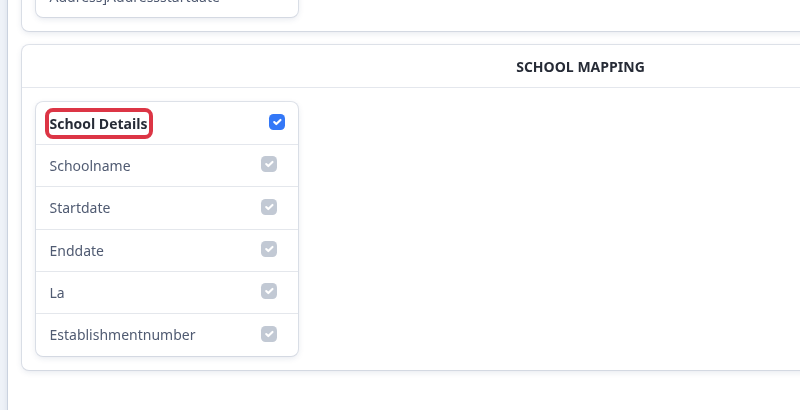
"School Details" sends each school-history record that Admissions+ holds for the student. The fixed fields are school name, start date, end date, local authority, and establishment number. It does not use a separate "Primary School" question or map an arbitrary application question into these fields.
What it does not do
- The fixed Bromcom export does not let you add or replace its standard fields.
- An extra question needs a matching User Defined Field in Bromcom before you import it into Admissions+.
- Admissions+ cannot export school information when the student has no school-history record.