
If a student's bursary account keeps showing the wrong application year after they renew, this is expected behaviour, not a duplicate account fault. Bursary 16+ creates one linked account per academic year, and only the newest one is "active."
Open the student's profile and go to the "Bursary History" panel to see every year's account for that student in one place, with a badge marking which one is currently active.
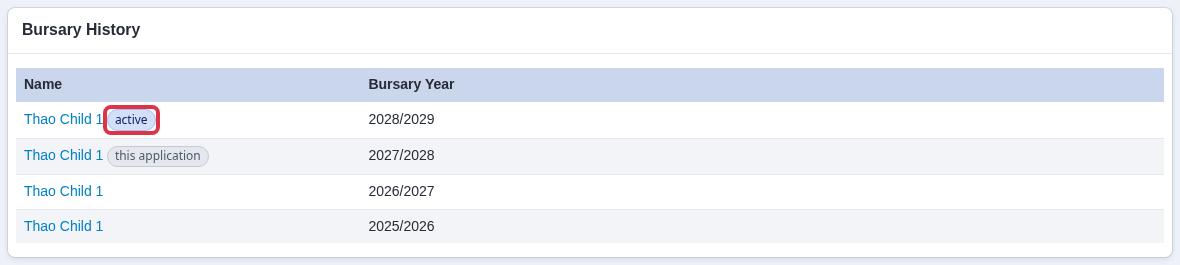
- Each row is a separate account for one bursary year.
- The "active" badge marks the account the student currently signs in with.
- The other rows are not duplicates to clean up - they are that student's bursary history, kept so past years' applications, decisions and payments stay on record.
"How to Manage Duplicate Accounts" does not apply here. That tool is for two separate people who created two unrelated profiles by mistake. A Bursary 16+ renewal is not that - it deliberately creates a new linked account each cycle, so merging or deleting one of these accounts as a "duplicate" would remove real application history.
You also can't fix a stuck-on-the-wrong-year account by editing the "Bursary Application Year" value on the student's profile.
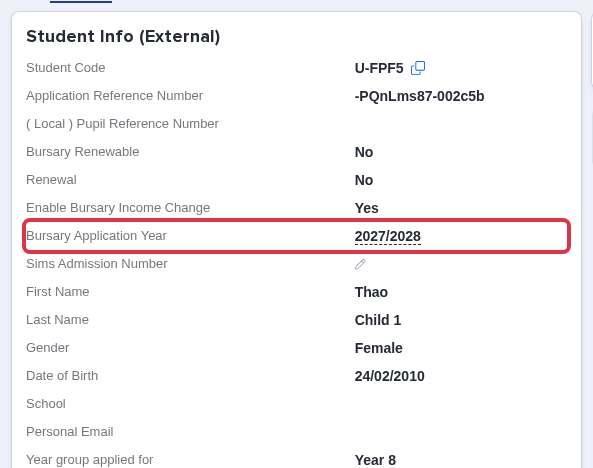
- Changing this value only relabels that one account's year. It doesn't move the student's login to a different account, doesn't remove the extra account, and doesn't change which account is marked "active."
- This field is for correcting a student's year when they applied to the wrong one in the first place - see "How to create or update your academic year in Bursary16+." It isn't a way to undo or redirect a renewal.
If a student is stuck signing in to the wrong year's account after renewing, contact Applicaa Support with the student's name and which year's account they should be using. Support removes the unwanted extra account and moves the student's login onto the correct one, then resends the welcome email so the student can set a password for it. You can reach Support from the Emma launcher in the bottom corner of any page.
