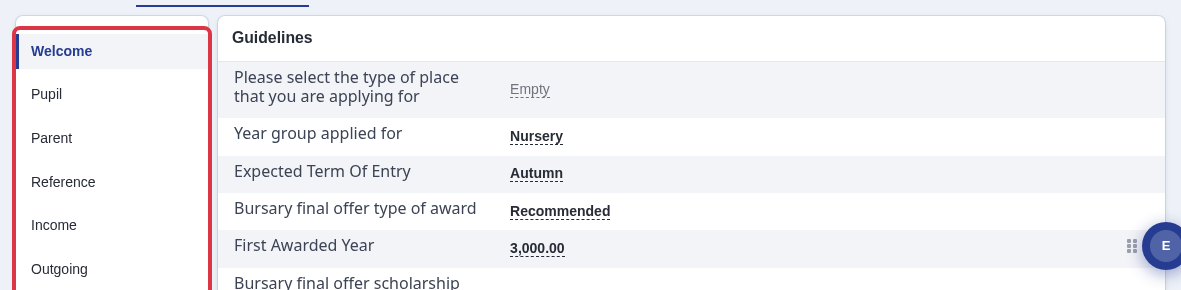
Once students are able to complete their bursary application you will be able to check them by going to their profile - You may do so by searching for a particular student or going to the list of students via the dashboards.
If you choose to search for a student, you may do so by using the search bar at the middle top part of the system.

If you type in a student's name it'll give you the students name and email and if you click on it and it'll bring you to the student's profile.

The student profile will have an overview which has the student's basic information that you might need.

But to check further you may click on "Concession and Bursary and see all the form steps they've gone through and the answers they have provided.


The student's name is a hyperlink that will show you the student's profile as well.

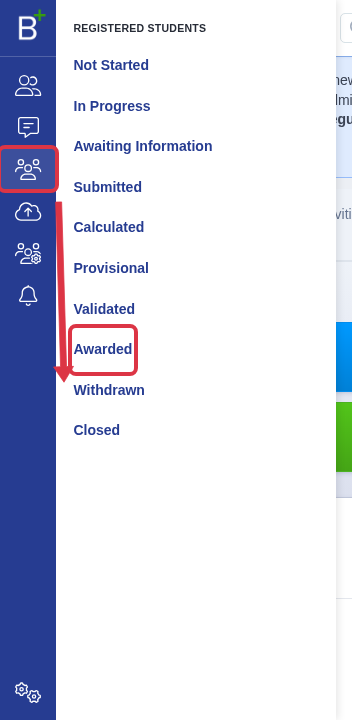
Where to find the "Awarded" status
There is no status called "Approved". Bursary applications move through a fixed list of statuses: "Not Started", "In Progress", "Awaiting Information", "Submitted", "Calculated", "Provisional", "Validated", "Awarded", "Withdrawn" and "Closed". "Awarded" is the status that means the school approved the application. The "Registered Students" menu lists a separate link for each status.
The student's own profile shows the same status. Next to the student's name, the "Bursary Status" tile names the status, for example "Awarded".

How to see which steps are still open
The "Bursary Status" tile also shows a count, for example "4/11". The first number counts the steps the student completed. The second number is the total steps in the application.

The count does not name the open steps. Open the student's profile and click "Concessions and Bursary". The page lists each step on the left. Click a step to see its answers on the right. A field marked "Empty" means the student has not answered it yet.